top of page

WIZE SNAPS API · RECIPE 01
Decision profiles in a spreadsheet
WIZE SNAPS API · RECIPE 01 · GOOGLE SHEETS
Paste a script into a Google Sheet and your lead list starts telling you how each person decides, and rewriting your draft to suit. About ten minutes to set up, and no deployment of anything.
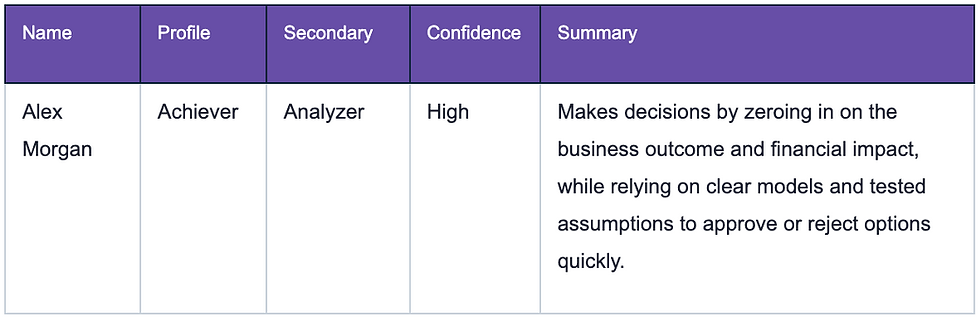
What lands in the sheet
You give it a name, a role, and something the person has actually written. It gives you a decision profile, a confidence level, a plain-English read, and a rewrite of whatever you were about to send them.
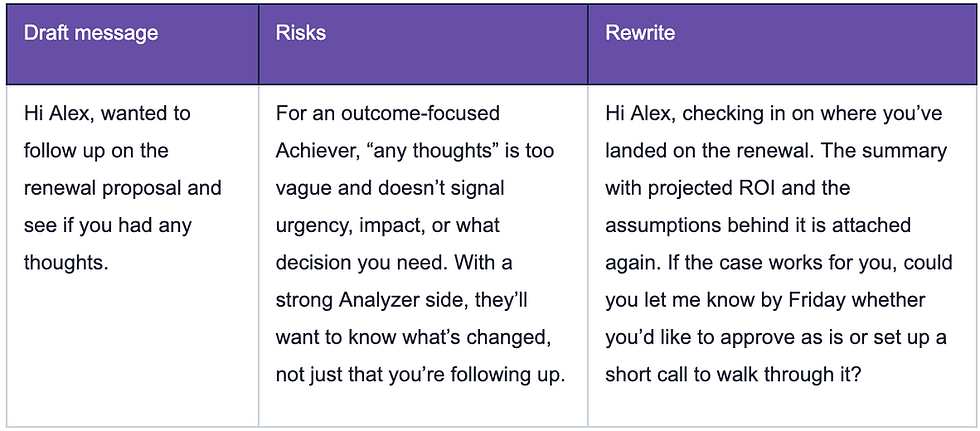
Then the second pass takes your draft and works on it.
The part that decides whether this is any good
The profile is only as good as the context you hand it. This matters more than any other choice you make, so it is worth seeing the difference on the same person.
Two lines of notes, the sort that usually sits in a CRM:
Leads enterprise renewals. Asks for commercial detail early and dislikes long preamble.
Result: Medium confidence.
Same person, same job title, with their LinkedIn About section pasted in instead:
I run enterprise renewals for a 40-person commercial team. Twelve years in SaaS, most of it turning around accounts that were already halfway out the door. I care about one number and it is net revenue retention. Most of what gets sold to me as “engagement” does not move it. Show me the model, show me where the assumption breaks, and I will make a call in the meeting rather than taking it away for a month.
Result: High confidence.
A typical CRM one-liner, something like “spoke Tuesday, keen”, returns Low. The API is being honest when it does that, and a Low confidence profile is worse than no profile at all, because it sits in a column looking like data. Fill the context columns before you spend credits on them.
Get Started
-
Install Wize Snaps. Google asks for three permissions: the sheet you have open, a connection to the Wize Snaps API, and dialogs inside Sheets. It doesn't ask for your other files, your email or your contacts.
-
Extensions › Wize Snaps › Setup › Set up this sheet. It builds a Leads tab with the right columns and an example row.
-
Setup › Set API key. Get a key if you don't have one. New accounts start with 100 free credits.
-
Fill in someone real. Name, role, and their own words. A LinkedIn About section works far better than a CRM one-liner.
-
Get profiles, then Analyse drafts. In that order.
Your API key
You set it once and it works in every sheet you open. It's saved against your Google account, never in a cell, so people you share the sheet with can't see it or spend your credits. Extensions › Wize Snaps › Setup › Forget my API key removes it.
Want the code?
The add-on is open source. If you'd rather read it, change it or paste it into your own sheet, it's on GitHub.
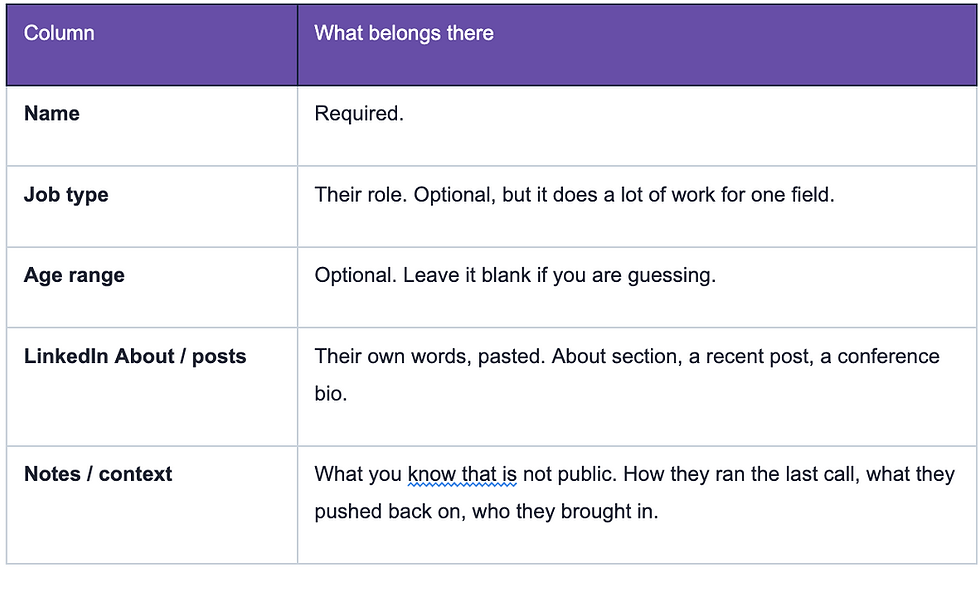
What goes in each column
Five columns are yours to fill. The rest the add-on writes.
Google will call it an unverified app.
On the first run you get an authorisation screen, then a warning that Google has not verified this app. Click Advanced, then go through. That warning appears because it is your own script rather than a published add-on. It is your code, calling your API, with your key.
What goes in each column
Five columns are yours to fill. The rest the add on writes.
Both context columns get sent together, labelled, so the difference between how someone describes themselves and how you describe them is preserved. Either one on its own is fine.
Credits
New accounts start with 100 free. A profile costs 1 credit, a message analysis costs 2.
Rows that already have a result are skipped and not charged, so profiling five new people on a finished list of fifty costs five credits rather than fifty-five. To redo a row you clear its Profile cell and run it again.
There is no =WIZESNAP() formula on purpose. Sheets re-runs custom formulas every time anything recalculates, which on a list of any size would spend credits quietly all day. It runs from the menu and writes plain values instead.
Two things it will not do
Read a LinkedIn URL - use the Wize Snaps LinkedIn extension for that
Pasting a profile link into the context column does nothing useful. The API reads the text you give it, it does not go and fetch the page. Copy the About section across instead.
Rescue a thin CRM
Pointing this at a database of names and one-line notes produces a column of Low confidence guesses. If your CRM does not hold anything the person has written, you need a step that gets that text in before this one is worth running.
Build something else with it
The whole thing is two API calls. POST /api/v1/snap takes a name and some context and returns a profile with a snap ID. POST /api/v1/snap/comms takes that ID and your draft, and returns what works, what does not, and a rewrite. Authentication is an x-api-key header.
That is small enough to drop into anything. A spreadsheet is just the version that needed no deployment.
Grab a key at snap.wizer.business/dashboard/developers, take the 100 free credits, and see what it says about someone you are about to write to.
Wize Snaps is built by Wizer. The seven decision profiles come from Dr Juliet Bourke’s research on decision lenses. Documentation is at snap.wizer.business/docs.
bottom of page